MongoDB
Getting Started
First, to login to MongoDB shell, just start your Docker container for the database course by running the run script and then run the command:
To exit, the command exit can be used.
The CLI (Command-Line Interface) that opens can be used to type in Mongo commands. The CLI also accepts Javascript code. Read more about mongosh
To try out that it supports Javascript code, we can try for example defining a variable and a very simple if - else statement:
MongoDB + VSCode
As most of the MongoDB commands can be quite long, it is recommended to first create the commands in your Visual Studio Code and then to be copied and run in your console.
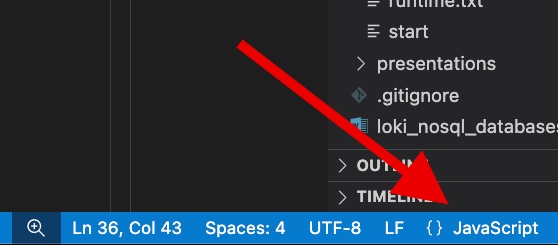
In VSCode you can create a new empty tab (file) and on the bottomright corner of the VSCode window, you should change the document type (which is Plain Text by default) to JavaScript.
© Aleksi Postari